
Your whole team in one window
Voice rooms, chat, meetings and tasks on your own server. Light like Discord, easy like Telegram.
Open source (BSL 1.1) · macOS · Windows · Linux · web
Why Calab
Light
0.05 % CPU outside a call, ≈ 7 % in voice (MacBook Air M4). A hidden window decodes no video.
Your own server
docker compose up— and a minute later it all works. Your data stays with you.Behind VPNs and firewalls
UDP blocked? TURN/TLS over port 443, just like regular HTTPS.
Meeting recordings
The transcript and summary arrive as a card in the room chat.
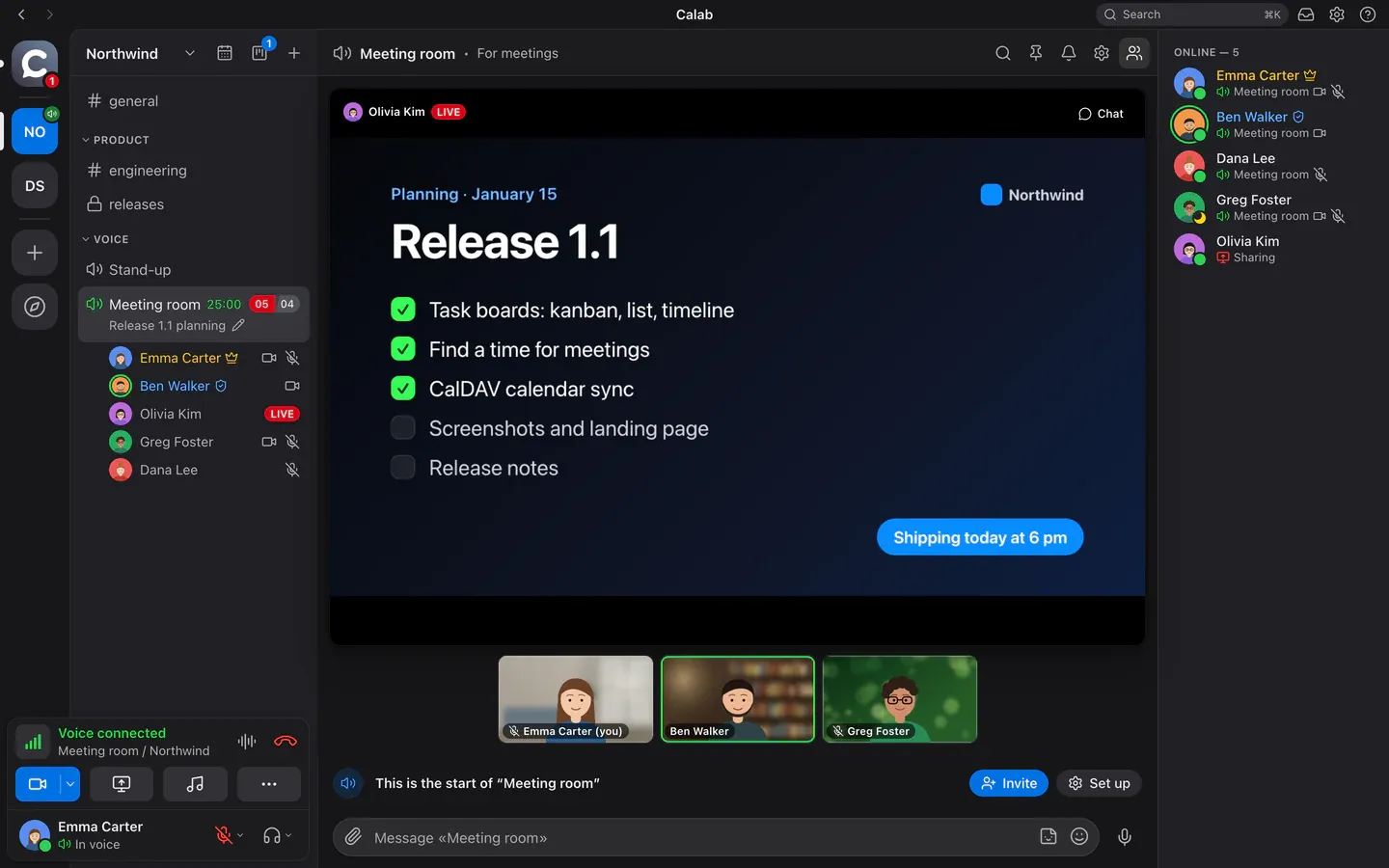
Voice and video
Join a room and start talking
Voice rooms are always open: one click and you’re in the conversation. Cameras, screen sharing and one-on-one calls live right there — no separate links or apps.
- RNNoise noise suppression and AEC3 echo cancellation — clean even without headphones
- Push-to-talk and voice activation, even in the background
- Screen sharing in AV1 or hardware H.264, with a pointer and drawing on top
- Camera with background blur or a picture
- Meeting recordings with a transcript and summary right in the chat
Chat
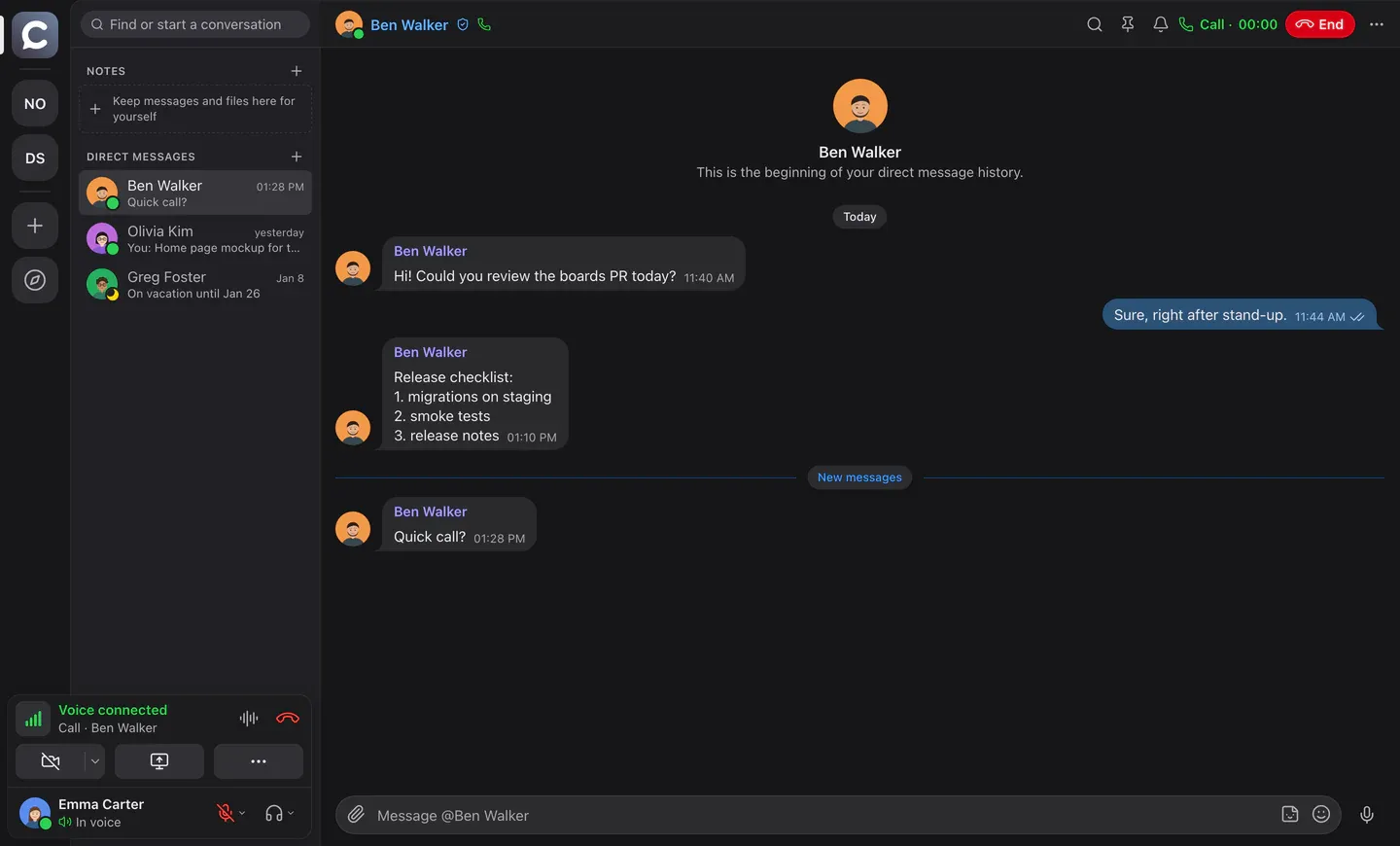
Chat like Telegram
Every room has its own chat: replies, reactions, forwarding, stickers, voice messages, files with previews, pins and search. Read ticks, just as you’re used to.
- Forward to several chats at once
- Workspace sticker packs
- Voice messages, music and video with a built-in player
- Mentions, per-room notifications, workspace search
Calendar and meetings
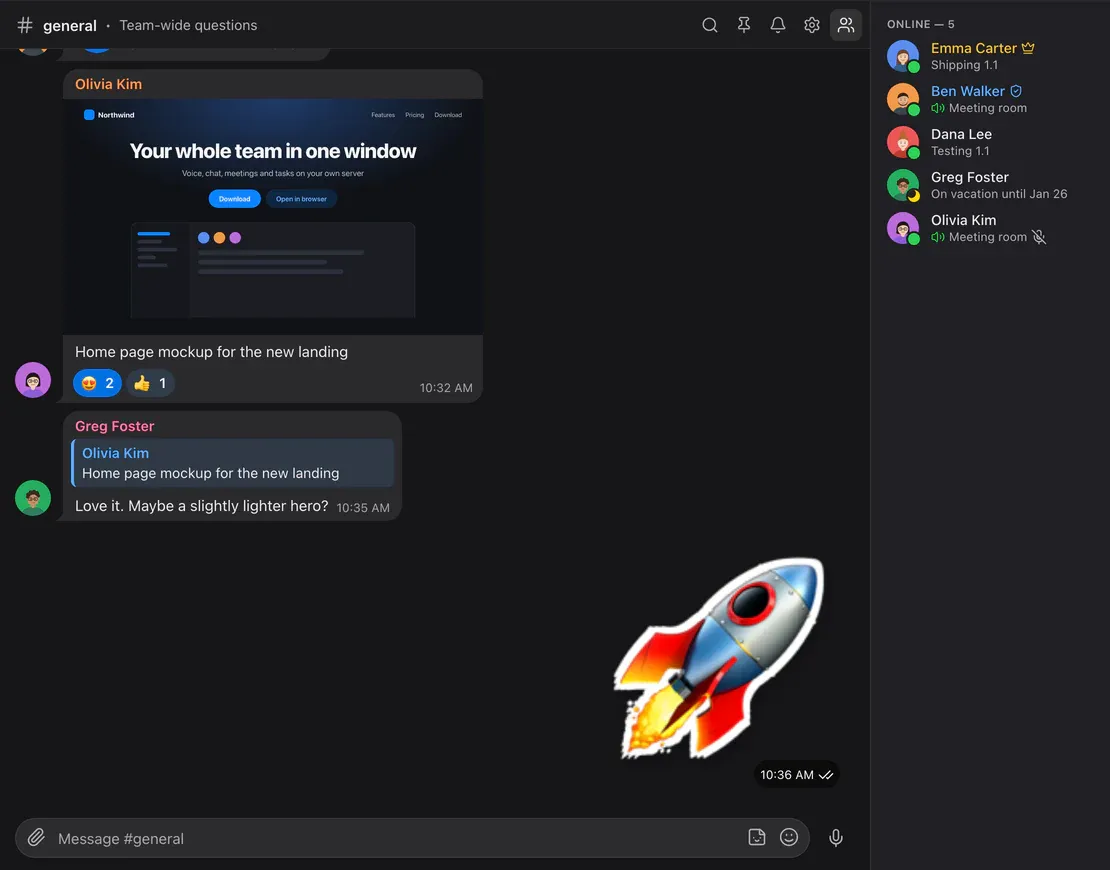
Meetings where the conversation is
The calendar is built into the app: your day of meetings, invitations, attendees’ answers, the meeting room with a “Go” button and reminders 15 minutes before.
.ics invitations
An email with invite.ics adds the meeting to Apple, Google, Outlook or Yandex calendars. External attendees answer by link and join as guests.
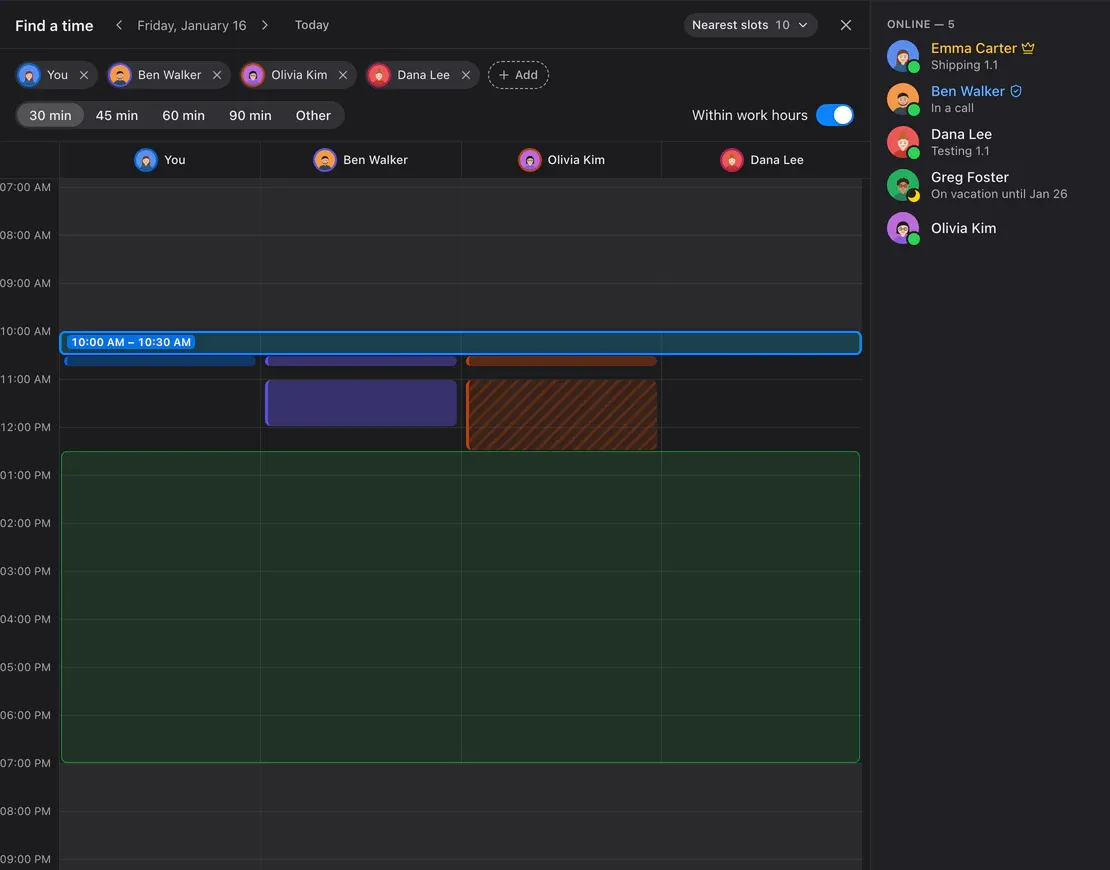
Find a time
Colleagues’ busy columns, shared free windows and the nearest slots — one click creates the meeting.
CalDAV
Connect Yandex, iCloud, Fastmail or Nextcloud: your busy time counts, and Calab meetings show up there by themselves.
Task boards
Tasks next to the conversation
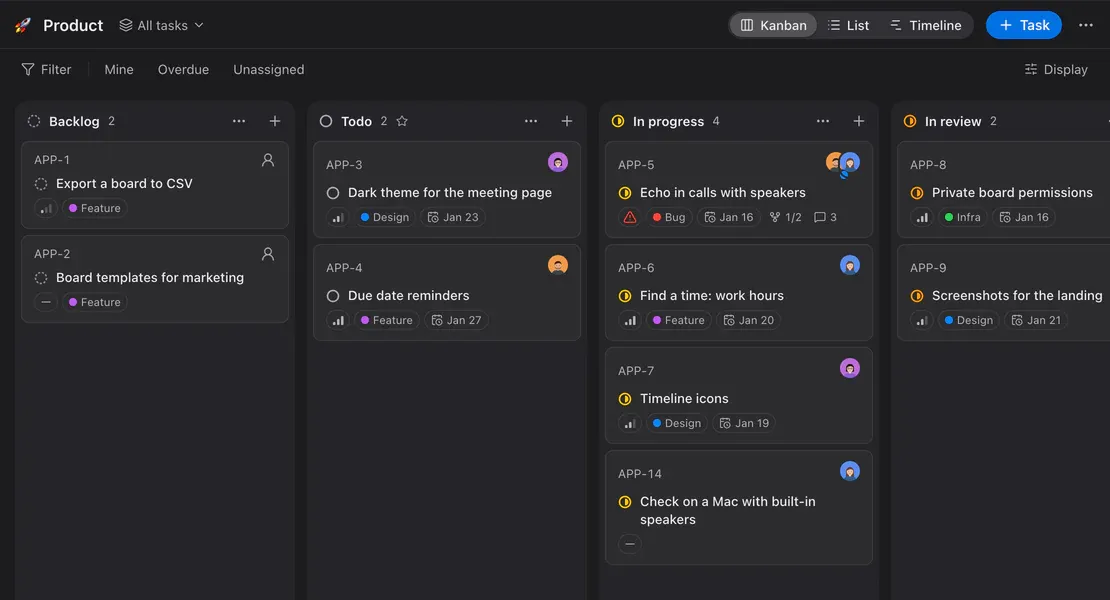
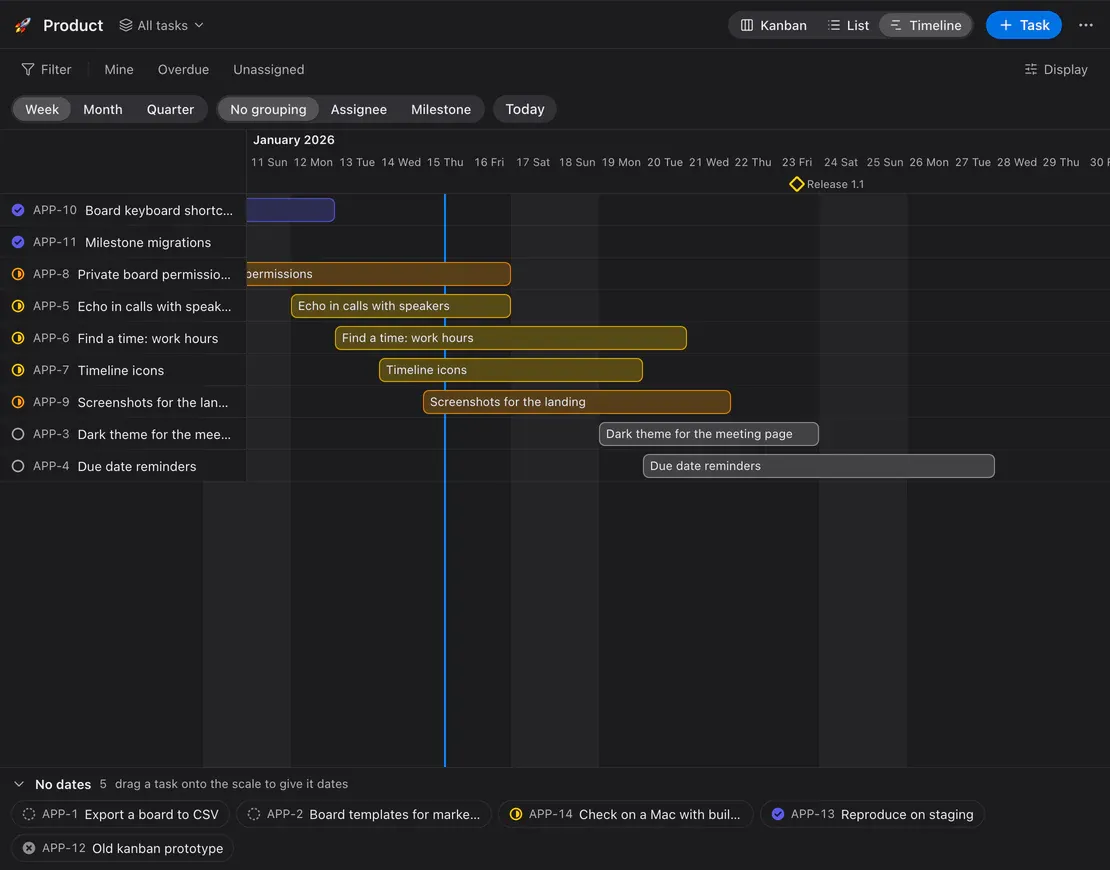
Kanban, list and timeline in the spirit of Linear — without another service. Create a task from any message; a link to it unfolds into a card in the chat.
- Statuses, priorities, labels, milestones and due dates
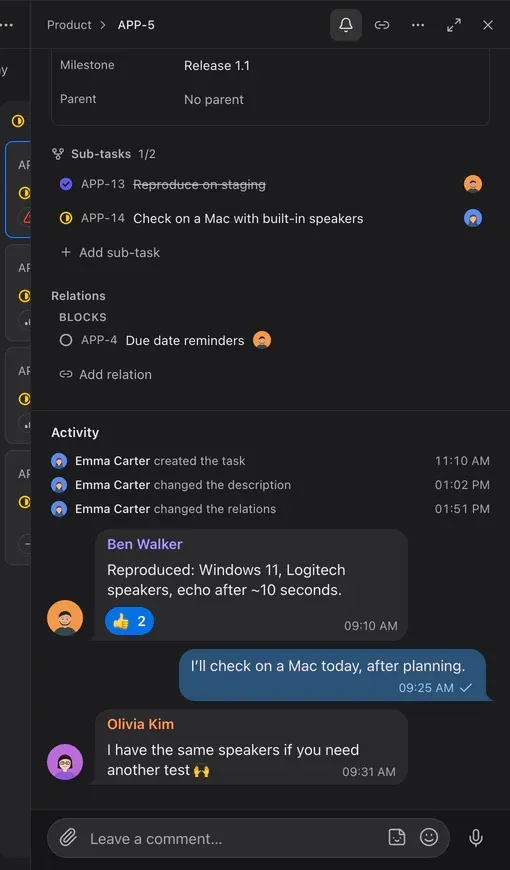
- Several assignees, subtasks and relations
- Comments like chat: reactions, stickers, voice messages
- Filters, saved views and keyboard shortcuts
Free includes 3 boards; Team and Enterprise are unlimited.
Notes
Private shelves for everything important
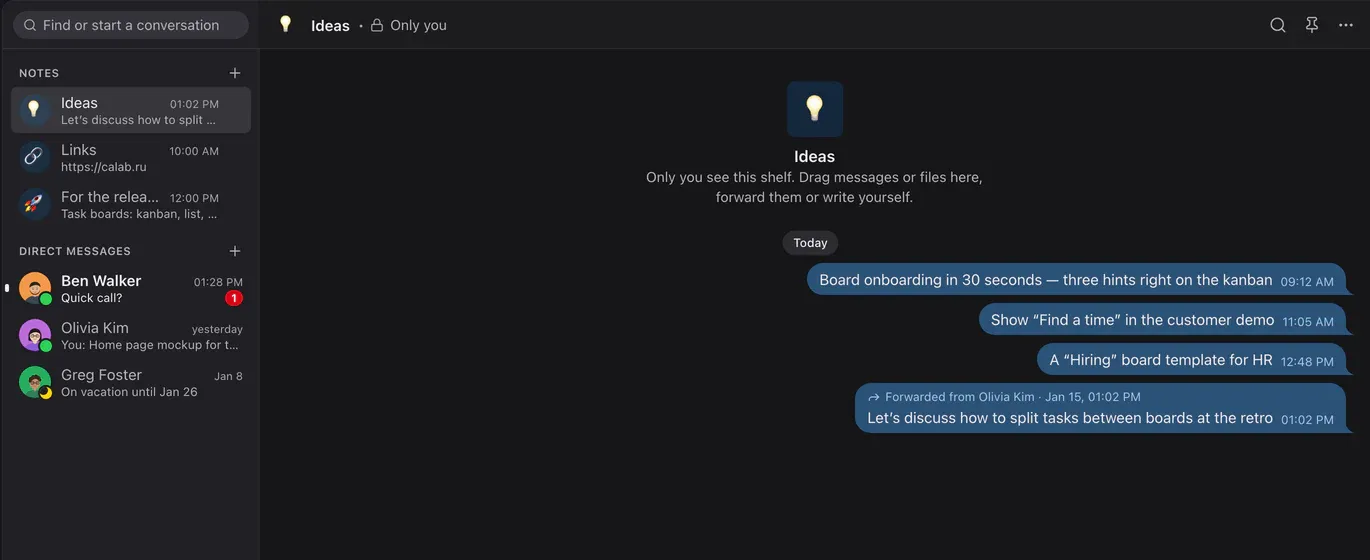
Up to 20 shelves with your own names and emoji — like Saved Messages in Telegram, only several. Only you can see a shelf.
- Drag a message onto a shelf or forward it
- Drop files from Finder or Explorer straight onto a shelf
- Pins and search, as in any chat
Guests
Guests without sign-up — with your approval
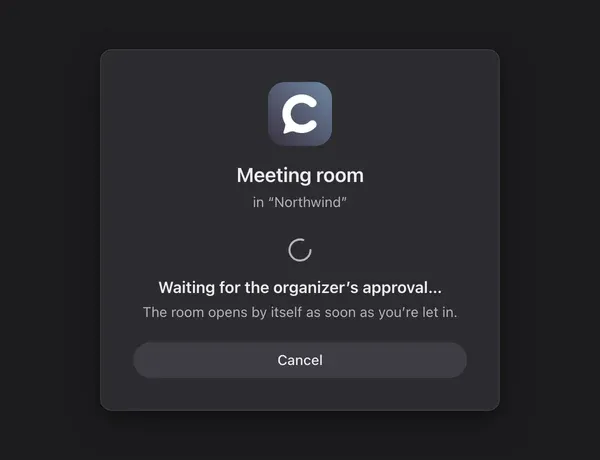
A guest link leads straight into the room: the guest types a name and joins the conversation. Want control? Turn on approval: the organizer sees “asks to join” and clicks “Let in”.
- A guest sees only their room
- Approval per room or per link
- A sound and a waiting counter for the organizer
Bots and SDK
A bot is a member like everyone else
A bot uses the same API as the app: it writes in chat, answers /commands, talks in voice rooms and works with boards within its rights.
- TypeScript SDK, Node and Python examples
- Events over WebSocket or a webhook signed with HMAC
- Rights through roles, like people
import { Bot } from '@calaba/bot-sdk';

const bot = new Bot(process.env.BOT_TOKEN, {
  server: 'https://app.calab.ru',
});
await bot.commands([{ name: 'echo', description: 'Repeat the text' }]);

// every message from someone else
bot.on('message', (m) => bot.reply(m, m.content));
// "/echo hi" → "hi"
bot.on('command', (c) => bot.reply(c, c.args));

await bot.start();
Self-hosted and secure
Your server, your data
Calab installs on your Linux server with one command and depends on no external services.
Step 1. Set up the server
A Linux host with Docker and a domain. One command and it’s running within a minute; Let’s Encrypt certificates are issued automatically.
infra/docker/deploy.shStep 2. Install the app
macOS, Windows or Linux. Or just open Calab in your browser — nothing to install.
Step 3. Invite your team
Send an invite link. Guests joining a single meeting don’t need an account.
Encrypted in transit
The API and signaling use TLS; voice and video use DTLS-SRTP.
Your data stays yours
Messages, files and recordings are stored only on your server.
Works behind a VPN
UDP blocked? TURN/TLS over 443 — to the network it’s ordinary HTTPS.
Rights for everything
Roles and per-room and per-board rights are checked by the server.
Pricing
Free, Team, Enterprise or your own server
Start for free. Need more? Team or Enterprise in the cloud, or Calab on your own server.
Start here
Free
Free
For small teams: up to 5 people per room
What’s included
- Voice room
- up to 5
- Workspace members
- up to 50
- Audio quality
- up to Normal
- Screen sharing and camera
- 720p, 15 fps
- Screen shares per room
- 1
- Files
- 5 GB
- Bots
- 1
- Sticker packs
- 1
- Task boards
- 3
- Calendar
- yes
- CalDAV
- yes
- Support
- no
- Price
- free
Team
On request
Up to 50 people per room, unlimited video
What’s included
- Voice room
- up to 50
- Workspace members
- unlimited
- Audio quality
- any
- Screen sharing and camera
- unlimited
- Screen shares per room
- unlimited
- Files
- 1 TB
- Bots
- 20
- Sticker packs
- unlimited
- Task boards
- unlimited
- Calendar
- yes
- CalDAV
- yes
- Support
- yes
- Price
- on request
Enterprise
On request
Cloud without limits and priority support
What’s included
- Voice room
- unlimited
- Workspace members
- unlimited
- Audio quality
- any
- Screen sharing and camera
- unlimited
- Screen shares per room
- unlimited
- Files
- unlimited
- Bots
- unlimited
- Sticker packs
- unlimited
- Task boards
- unlimited
- Calendar
- yes
- CalDAV
- yes
- Support
- priority
- Price
- on request
Self-hosted
Your server
Your infrastructure, BSL 1.1 licence
What’s included
- Voice room
- unlimited
- Workspace members
- unlimited
- Audio quality
- any
- Screen sharing and camera
- unlimited
- Screen shares per room
- unlimited
- Files
- unlimited
- Bots
- unlimited
- Sticker packs
- unlimited
- Task boards
- unlimited
- Calendar
- yes
- CalDAV
- yes
- Support
- no
- Price
- BSL 1.1; commercial on request
Self-hosted: free for non-commercial use, with “Powered by GPTunneL” in the interface; commercial use under a GPTunneL licence. Every Calab version moves to the Apache License 2.0 four years after release. Licence text
Download
Apps for every platform
An Electron client with global hotkeys, push-to-talk in the background and sharing of any window.
macOS
Apple Silicon · Intel
DMG, macOS 12 or later
Signed with a Developer ID and notarized by Apple, so it opens without warnings.
Windows
x64
.exe installer, Windows 10 and 11
The build isn’t signed yet: on first launch SmartScreen shows “Unknown publisher” → “More info” → “Run anyway”.
Linux
AppImage · deb
x64
Make the AppImage executable before running it:
chmod +x.
Or open the web app in Chrome, Edge, Safari or Firefox.
FAQ
The short version
What do I need to run my own server?
A Linux host with Docker, a public IP and a domain. Open ports: 80 and 443 (TCP and UDP), 7881/TCP, 7882/UDP. A team of up to 30 people needs roughly 4 vCPUs and 8 GB of RAM; the exact figure depends on how many screens are shared at once.
What are meeting recordings, and where does the audio go?
A workspace connects to GPTunneL once, with a code in the settings. Then any member except guests can record in a voice room; the server does the recording. After the meeting the audio goes to GPTunneL for transcription, and a card with the summary and the full transcript arrives in the room chat; the audio is kept as the card’s attachment for 30 days. Recording can be disabled in the room settings.
How much bandwidth does Calab use?
Voice takes 16–64 kbps per speaker (32 by default) and about 1 kbps during silence. Sharing a static screen takes 20–300 kbps, capped at 2 Mbps for 1080p. The server sends each viewer the quality their connection can handle.
How does the app update?
The desktop app updates itself on launch. The macOS build is signed and notarized by Apple; the Windows build isn’t signed yet, so SmartScreen may show a warning. The web app is always up to date.
What’s new in 1.1?
Task boards — kanban, list and timeline, tasks from messages and chat-like comments; “Find a time” across colleagues’ calendars and an external calendar over CalDAV. 1.0 brought the calendar and meetings, Notes and guest approval. The full list is in the changelog.
How is the connection secured?
The API and signaling use TLS; voice and video use DTLS-SRTP. Messages and files are stored only on your server. There is no end-to-end encryption yet: media passes through your media server.
Does it work over a VPN or a corporate firewall?
Yes. If UDP isn’t available, the client switches to TCP and then to TURN/TLS on port 443 — to the network it looks like ordinary HTTPS.
What are the limits of the current version?
It’s designed for 20–30 people online at the same time and up to three screen shares per room. Horizontal scaling is on the roadmap.
What happens when a 6th person tries to join a room?
On the Free plan, a voice room holds up to 5 people at once. The 6th person can’t join — they’ll see a message about the plan limit and an option to move to Team.
How do I get a commercial license for self-hosting?
Email it@gptunnel.ai and tell us about your company and use case — we’ll send you the terms.
How is Enterprise different from Team and self-hosted?
Team is the cloud with limits: up to 50 people per room, up to 1 TB of files, 20 bots, and support. Enterprise is the cloud too, but with no limits at all, like your own server, and with priority support. Self-hosted is Calab on your own infrastructure under BSL 1.1, with no limits. Team and Enterprise are priced on request at it@gptunnel.ai.
How do I buy Team?
Email us at it@gptunnel.ai — we usually turn the plan on within a day.